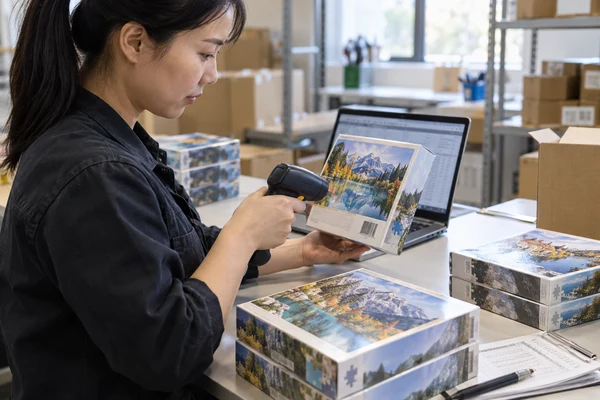
Custom puzzle barcode printing begins with a correct product identifier and a symbol suited to its scanning environment. A QR code for a poster, artist story or customer guide has a separate purpose and needs its own destination check. Approve both the data and the physical printed code before releasing packaging. This guide helps retail brands and importers manage code ownership, artwork placement, small text and finished-pack checks so a visually attractive puzzle box also works at receiving, checkout and customer use.
Separate retail identification from customer QR destinations
A retail barcode identifies the trade item for the intended business system. Its data should match the product record used by the brand and trading partner. A marketing QR code may instead open an artist biography, an image guide or a customer-support page. Do not assume a code that opens a website can also serve as the retail checkout identifier.
GS1 describes EAN/UPC barcodes as a widely used retail barcode family. Confirm the symbol and identification requirements with your retailer before preparing artwork. If a trading partner requests a newer two-dimensional approach, obtain the exact data and implementation instructions rather than substituting a generic QR code.
Assign one data owner for every sellable SKU. That owner should supply the approved identifier, human-readable number and intended product description. The printer should not select a number by copying another box or inventing a code from an internal filename. Keep the ownership record even when an agency generates the final symbol artwork.
Review each variation deliberately. Different artwork, piece counts or pack contents can create identification questions that need the applicable rules and retailer's guidance. The 500-piece retail puzzle can support the product discussion, but its category name does not determine a barcode number. Connect the actual finished item to a controlled SKU before the code is placed.
| Code purpose | Buyer approval | Physical review |
|---|---|---|
| Retail identification | Correct identifier and trading-partner requirements | Symbol quality and finished-pack placement |
| Customer information | Correct URL and useful destination | Phone use on the real pack |
| Warehouse identification | Correct carton or shipment data | Label match and intended scanning environment |
| Internal sample tracking | Clear sample and version reference | Readable label without confusing retail data |
Prepare the barcode as controlled production artwork
Use a reliable generation workflow and provide the symbol at the intended output size. Ask the designer and printer which file format preserves clean edges and correct dimensions in their process. Do not use a screenshot clipped from a website or stretch a symbol to fit a spare rectangle. Its geometry is part of its functionality, not simply an illustration style.
Preserve both the bars or modules and the surrounding quiet area. A decorative border, nearby text or a cropped image can interfere with a space that appears empty but has a technical purpose. Select the symbol's dimensions using the relevant specification and scanning environment. A single minimum size copied from an unrelated product cannot cover every barcode type and printing process.
Keep the human-readable interpretation and the encoded data consistent. Ask the reviewer to compare the supplied number, symbol and SKU record. A printed number can look correct while the encoded data differs. Record the approved file and version so a later packaging revision cannot accidentally bring back an older code from the designer's working folder.
The GS1 barcode-quality checklist addresses size, positioning and other practical factors. Use the applicable requirements to prepare the artwork and confirm the process with your printer. The checklist supports review; it does not prove the physical output will meet a retailer's requirements before a finished sample is checked.
Plan custom puzzle QR code printing around a useful destination
Custom puzzle QR code printing should begin with the customer task. A code might provide a larger reference image, assembly guidance or background on an illustration. Choose a destination that remains useful after the sale. A temporary campaign page that disappears while stock remains in stores can create a poor experience even if the printed code continues to scan.
Use a URL controlled by the responsible brand where possible and assign an owner to maintain it. If a redirect service is involved, confirm account ownership, continuity and the consequences of changing the destination. Do not print a personal employee link or rely on a short-lived test page. The physical pack may remain in use long after the launch team changes.
DENSO WAVE's QR code guidance specifies a four-module quiet zone around a QR symbol. Keep that margin clear and ask the printer to assess the proposed module size for the actual output. The correct margin is one requirement; it is not a guarantee that a small or poorly printed code will work in every condition.
Check the destination as well as the symbol. Open it on common customer devices, review mobile layout and ensure the content matches the pack's promise. If the code says view the reference image, the page should make that image easy to locate. Any requested customer data should have a clear purpose, and the brand should manage applicable privacy obligations separately from print approval.
Prepare codes before the box layout is frozen
Send your SKU list, retailer code requirements, proposed QR destinations and packaging dieline. We can discuss placement and the physical checks needed for your pack.
Reserve a custom puzzle safe area for codes and small copy
A custom puzzle safe area is a layout boundary that keeps important content clear of cutting, folding or assembly risks. Obtain the correct box or insert dieline and identify which lines are print guides rather than visible artwork. Place the code within a stable flat panel, with enough room for its required quiet zone and any identification text.
Avoid putting code modules across corners, lid joints, wrap seams or strongly textured features. A symbol that looks square on a flat PDF can become distorted or partly hidden on the assembled pack. Review the real box in the positions used at checkout and by the customer. If a label is planned, consider its applied surface and position as part of the same review.
Keep finishes away from functional symbols
Foil, heavy texture and reflective treatments should not be assumed compatible with a code. Ask for the symbol to sit on a suitable contrasting area and review the actual finished pack. The visual layout should make the code easy to find without sacrificing the printing conditions it needs.
For custom puzzle small text printing, use an actual-size proof and review the selected font, contrast and substrate. There is no universal point size that proves every line will remain readable. Regulatory copy needs its own destination-market review; a designer's visual approval does not decide those obligations.
Review the opening and storage sequence
Check whether shrink film, a price label or the opened lid covers the customer code. If the destination is intended for repeated use, place it somewhere the customer can retain. A reference card can be useful, but only if its code and destination remain consistent with the sellable product version.
Choose direct printing or a custom puzzle barcode label
A custom puzzle barcode label can support a packaging workflow when market or channel information is applied separately. Direct printing integrates the code with the box artwork. Neither is automatically the better option. Compare data stability, SKU variety, application control, finished appearance and the ability to check each output against the correct product record.
For a label, define the stock, intended position, adhesive suitability and whether it will cover other information. Sample it on the actual box finish rather than on plain paper. Check that it remains flat and readable after normal handling. Do not promise a universal adhesive performance or removal characteristic without evidence for the chosen material and surface.
The application instruction should include a diagram and an unmistakable SKU reference. Similar-looking artwork can make labels easy to mix. Keep only the correct label version at the relevant packing operation and agree how superseded stock is identified. A perfect label applied to the wrong box is an identification error that print-quality verification alone will not solve.
If a label is added by a warehouse or channel partner, state that responsibility in the release record. The factory should know whether it must leave a defined blank area or apply supplied labels. The Amazon seller preparation guide discusses a particular channel handover; use the current instructions of your actual receiving partner rather than assuming all retail channels follow the same label system.
Distinguish formal verification from a successful scan
A successful scan shows that one device read the code under those conditions. Formal verification assesses defined symbol and print-quality properties using an appropriate verifier and method. Both can be useful, but they are different forms of evidence. A phone camera opening a URL should not be reported as a retail-barcode verification grade.
GS1's retail 2D implementation guidance recommends verification and distinguishes it from validation of a code's web destination. This distinction is particularly useful for a pack carrying both identification data and customer content: check the physical symbol, then separately confirm where it sends the user and what business systems receive.
Ask a suitable provider which sample and reporting scope it requires. Supply a finished pack when surface, curvature or placement matters. Request the applicable report rather than a generic statement that the code passed. Retain the symbol version, sample identity and date so the evidence can be linked to the artwork and print process being approved.
Run practical customer-use checks alongside the formal evidence where relevant. Test the QR code on the finished pack under ordinary indoor lighting and from a natural handling position. Record devices and conditions without claiming universal compatibility. When an issue appears, investigate size, print, surface, contrast or destination systematically instead of enlarging the code without identifying the cause.
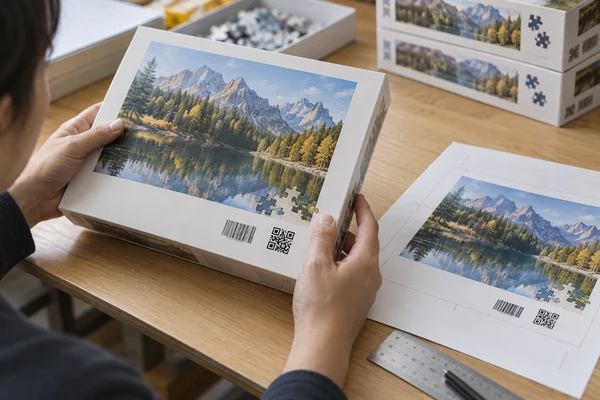
 PuzzleZa
Use a custom puzzle artwork check before production release
A custom puzzle artwork check should confirm product identity, encoded data, visible numbers, URL ownership, copy, dieline version and the intended symbol size. Assign separate reviewers for data correctness and print feasibility if different people own those tasks. One final PDF should carry the consolidated decision, with older files clearly superseded.
Create a controlled code register with SKU, product description, identifier, symbol file, destination, panel location and approval status. This small record is particularly valuable for ranges with similar box designs. Keep a thumbnail or reference image beside each SKU so the packing team can distinguish editions without relying only on an unfamiliar product name.
Ask the factory to confirm the print and finishing route, then identify which physical evidence remains required. The PuzzleZa approval process is a useful point for agreeing that handover. A prepress review addresses files; a finished-pack review addresses manufactured output. Both should refer to the same released version rather than separate unofficial proof copies.
For factory-side checks, state whether the scope includes data matching, applied label placement, print-quality evidence or selected functional scans. Do not assume a broad inspection description includes every check. A clear scope lets the supplier and buyer decide what must be completed before the goods are released for freight.
- The identifier and destination have named owners.
- Every sellable SKU maps to the correct symbol version.
- Quiet zones and panel placement are preserved.
- Small copy is reviewed at actual size.
- Physical verification and destination checks are documented separately.
Maintain code reliability through shipment and reorders
Shipment inspection should compare selected finished packs with the released code register and artwork. Check the correct product version, visible label condition and agreed placement. If formal verification is required at this stage, define it in the inspection brief. A last-minute phone scan should not replace an evidence requirement that the retailer already specified.
Keep the digital destination maintained after launch. Check redirects when pages move, and ensure support or reference content remains accurate for the physical edition. A packaging reorder can use unchanged printed artwork while its linked page has changed substantially. Review both sides of that connection so customers receive the information promised on the box.
Before a new order, confirm whether SKU, pack contents, retailer requirements or code placement has changed. Review the applicable identification rules and refresh the physical evidence when construction or output changes. Send your code register and packaging requirements to PuzzleZa so the quotation and sample discussion begins with controlled data rather than a request to add a barcode later.
Frequently asked questions
Can a marketing QR code replace a retail barcode?
Do not assume that it can. A marketing code opens customer content, while retail identification must meet the trading partner's data and symbol requirements. Some retail 2D implementations can support multiple uses, but they need the appropriate standards and partner confirmation. A generic website QR code is not that confirmation.
Who should provide a custom puzzle barcode number?
The responsible brand or authorised data owner should provide the approved identifier and its product mapping. The factory prints or applies the released artwork. It should not invent a number, copy another product's barcode or infer identity from a filename. Retain a controlled register for every sellable version.
Is a phone scan enough to approve barcode print quality?
It confirms that the particular phone read the symbol in that situation. It does not replace formal verification against the applicable requirements. Use a suitable verifier or service where required, then separately check data correctness and the customer destination. Keep each result linked to the finished sample and artwork version.
Where should a QR code go on a puzzle box?
Choose an accessible flat panel that preserves the required quiet zone and remains clear of seams, folds, decorative finishes and applied labels. Review the assembled pack, not only the PDF. If the code provides ongoing guidance, ensure the customer can still find it after opening and storing the product.
What should be checked before reprinting coded packaging?
Confirm SKU mapping, encoded data, visible numbers, current destinations, retailer requirements and artwork versions. Ask whether the print process, substrate or finish has changed. Reassess physical quality where needed and keep the destination active for existing stock, because a technically readable code can still lead to outdated or missing information.
Conclusion
Reliable custom puzzle barcode printing connects correct data with suitable artwork and physical evidence. Treat customer QR destinations as another maintained product component. Preserve the required margins, review the complete pack and retain the code register so future printing and packing follow the same approved product identity.
Build a controlled coded puzzle pack
Share the approved identifiers, artwork versions and intended sales channel with PuzzleZa. Contact info@PuzzleZa.com or use the enquiry page to discuss the print and sample scope.
Sources and scope
Sources reviewed on 2026-09-28. Manufacturing examples and review checklists are planning guidance, not claims about completed customer projects or guaranteed results. AI-generated images illustrate the topic and do not document an actual inspection.
- GS1: EAN/UPC barcodes — Retail identification and symbol-family selection.
- GS1: barcode quality checklist — Size, positioning and physical barcode-review factors.
- DENSO WAVE: QR code area and margins — Four-module quiet-zone guidance for QR codes.
- GS1: 2D barcodes at retail point of sale — Distinguishing barcode verification from web-destination validation.